











CloudXena IMAP Backup Tool for Mac
- Demo
- 4.91
- V23.9.0
Download for Mac
View an ad to download for free
Back up and export IMAP emails on Mac
CloudXena IMAP Backup Tool for Mac
CloudXena IMAP Backup Tool for Mac is a desktop application designed to help macOS users preserve, export, and manage email data from IMAP-enabled accounts. It supports a wide range of email services that use the IMAP protocol, making it suitable for individuals, professionals, and organizations that need to store mailbox content locally, migrate messages, or maintain archives for future access.
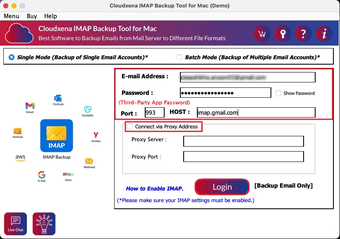
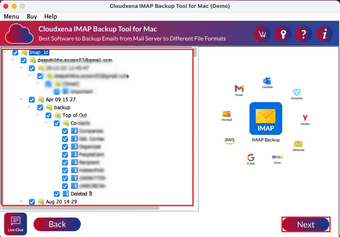
The software connects to an IMAP account using valid login credentials and allows users to access mailbox folders directly from the interface. After authentication, folders such as Inbox, Sent, Drafts, Trash, and custom folders can be selected for processing. This selective approach gives users control over the data they want to save instead of exporting an entire mailbox every time.
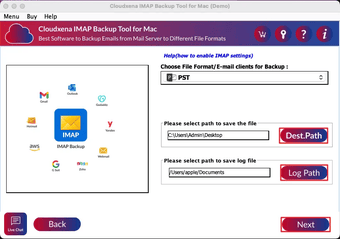
One of the application's primary features is support for multiple output formats. Email messages can be exported to formats including PST, MBOX, EML, PDF, MSG, and other commonly used file types, depending on workflow requirements. This flexibility makes the utility useful for transferring mailbox content between email clients, creating readable document copies, or maintaining long-term records.
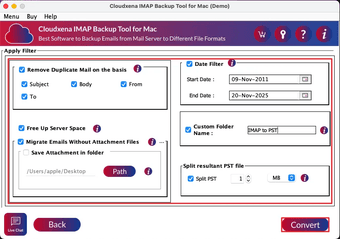
The tool also includes filtering options that help narrow the scope of an export. Users can choose specific folders, define date ranges, or select particular items based on their needs. These options can reduce processing time while creating more focused mailbox archives.
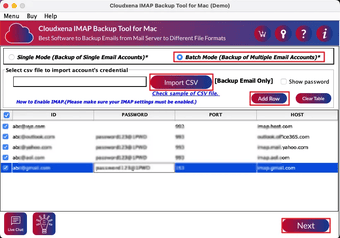
CloudXena IMAP Backup Tool for Mac is designed with a straightforward interface intended for users with different levels of technical experience. The navigation is organized into clear steps, allowing accounts to be added, folders to be selected, and export settings to be configured without a complicated setup process.
For users managing large mailboxes, the application is capable of handling substantial amounts of email data while preserving message structure and folder hierarchy during the export process. Attachments, metadata, and email properties are retained where supported by the selected output format, helping maintain the integrity of stored information.
The software can be useful in several situations, including mailbox migration, local data storage, business record keeping, legal documentation, and personal email archiving. Organizations that need to preserve communication history may find the available export options helpful for documentation and compliance purposes.
Compatibility with multiple IMAP-enabled email providers makes the application suitable for users working with different services. As long as an account supports IMAP access and valid credentials are provided, mailbox data can be accessed for export without requiring complex configuration.
The utility runs on macOS and is intended for desktop use. Local processing allows users to create copies of mailbox content that can be stored on internal drives, external storage devices, or backup locations chosen by the user. This can provide an additional layer of protection against accidental mailbox deletion, account changes, or service interruptions.
CloudXena IMAP Backup Tool for Mac offers a practical solution for preserving IMAP mailbox data in commonly used file formats. With support for selective exports, multiple email services, folder hierarchy preservation, and several destination formats, it provides a straightforward way to organize, migrate, and archive email content on macOS while giving users control over how their mailbox information is stored and managed.
Loading…
App specs
License
Demo
Version
23.9.0
Latest update
Platform
Mac
OS
macOS 10.14
Language
English
Size
208.58 MB
Developer
- CloudXena
- More programs (21)
CloudXena IMAP Backup Tool for Mac
- Demo
- 4.91
- V23.9.0
Download for Mac
View an ad to download for free
User reviews about CloudXena IMAP Backup Tool
Have you tried CloudXena IMAP Backup Tool? Be the first to leave your opinion!
Add reviewTop downloads Utilities & Tools for Mac
Top downloads Utilities & Tools for Mac
Top downloads Utilities & Tools for Mac
Related topics about CloudXena IMAP Backup Tool
Latest articles

Four Game Boy classics are coming to Nintendo Switch Online that you won’t want to miss

Apple TV’s best comedy premieres its fifth season today

Cyberpunk 2077 and Edgerunners shoot their way into Apex Legends

If you’ve made memes of Dwayne Johnson’s wig in ‘Moana’, don’t feel bad about it: he’s laughed his ass off watching them too

Sacha Baron Cohen unexpectedly presents a new Ali G film
Laws concerning the use of this software vary from country to country. We do not encourage or condone the use of this program if it is in violation of these laws. Softonic may receive a referral fee if you click or buy any of the products featured here.